Managing SoftLayer VPN subnet access

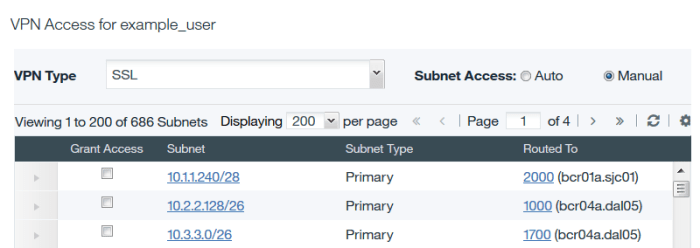
The IBM SoftLayer VPN only supports connection to 64 of your private subnets. If you have more than 64 private subnets in your SoftLayer account, you need to switch your VPN’s subnet management from Automatic to Manual, and select the specific subnets to which you want to connect.

The process for selecting subnets in the UI is not simple, especially if your account has hundreds of subnets. The subnets are not sorted, the dialog is small, and the pagination is slow.

VPN

However, it is possible to manage your VPN subnets programmatically using the SoftLayer API. I have created a Python script that allows you to manage your SoftLayer VPN subnet access. The script requires your SoftLayer username, API key, and a list of private IP addresses to which you want to connect. The script locates the subnets in your account that match your selected IP addresses, and assigns exactly these subnets to your SoftLayer VPN account.

You should wait a few minutes after running the script for it to take effect.

Travis and Pylint

For awhile my team has had Travis setup to run Pylint (as well as several other lints) against our code base. However, because we didn’t start this practice from the beginning, the number of warnings was a bit daunting. We told ourselves that we would fix this over time, and set our script to always return 0 so that Travis would be happy.

Then I read: Why Pylint is both useful and unusable, and how you can actually use it. I was inspired by this to try my hand at reducing Pylint’s scope. However, I took a different approach. Instead of disabling all checks and enabling them incrementally, I adjusted our script to check only for fatal and error findings in Pylint. Pylint encodes in its exit status what levels of messages were issued.

Here is my approach:

# Fail Travis build if Pylint returns fatal (1) | error (2)
if [ $(($rc & 3)) -ne 0 ]; then
    echo "Pylint failed"
    exit 1
else
    echo "Pylint passed"
    exit 0
fi

The number of errors found by Pylint was much more manageable than the full set of messages it produced. We were able to correct these problems easily, and move to addressing warnings and other messages incrementally over time.

Disaster recovery in the cloud

Disaster recovery in the cloud

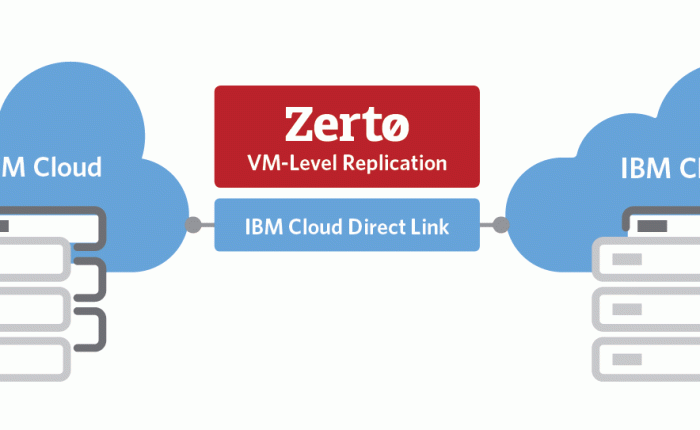
IBM and Zerto recently announced a partnership to bring Zerto Virtual Replication to IBM Cloud for VMware.

Zerto provides enterprise-class replication of virtual machines between a variety of environments. IBM Cloud provides enterprise-class VMware virtualized environments in the public cloud. Together, this partnership will bring a variety of public-cloud and hybrid-cloud disaster recovery topologies to the IBM Cloud for VMware offering.

I’m excited about the possibilities opened up by this partnership!

Cookie size in uWSGI

If you’re working to ensure your web application can tolerate more and bigger cookies (see my earlier post on cookie size in Nginx), you have to do it across your entire stack. I forgot to do this previously for my uWSGI application, and so today experienced a 502 Bad Gateway error because the cookies exceeded the default limit of 4kB.

I updated my uwsgi.ini file to add this statement:

buffer-size = 65536


File encryption with public-key cryptography

File encryption with public-key cryptography

Public-key cryptography is not suitable for encrypting large files. A naive approach to encrypting a large file will return an error if the file is larger than the RSA key:

[smoonen@smoonen encryption]$ dd if=/dev/zero bs=1024 count=1024 | openssl pkeyutl -encrypt -pubin -inkey pubkey.pem
Public Key operation error
140544802154400:error:0406D06E:rsa routines:RSA_padding_add_PKCS1_type_2:data too large for key size:rsa_pk1.c:151:

If you want to accomplish asymmetric encryption of large files, the general approach is to encrypt the file using symmetric cryptography, and encrypt the symmetric key using public-key cryptography. The OpenSSL smime command uses this approach, but it does not support extremely large files.

To support this case, I’ve written some simple file encryption shell scripts which I’ve posted on GitHub. These scripts are as follows:

  • genkeypair generates a private and public key pair
  • encrfile encrypts one or more files using AES-256 encryption, encrypts the AES-256 keys using public-key encryption, and saves the encrypted key as part of the encrypted file
  • decrfile decrypts a single file previously encrypted by encrfile, by extracting the encrypted AES-256 key, decrypting it using public-key encryption, and then decrypting the file itself. The decrypted data is sent to stdout.

IBM APM on PureApplication System

IBM APM on PureApplication System

Beginning with PureApplication version 2.2.2.0 released in September 2016, the use of IBM’s Application Performance Management monitoring is entitled for applications deployed on PureApplication System.

However, unlike IBM Tivoli Monitoring (ITM), there is currently no shared service available for automatically deploying APM agents into your PureApplication pattern instances. So you must arrange to install and configure the APM agents yourself.

But now this process is simplified! Several of my PureApplication colleagues have published an article describing how you can use script packages in your pattern to install and configure the APM agents in your pattern instances. You can find their article at IBM developerWorks.

How network outages affect PureApplication multi-system deployment

How network outages affect PureApplication multi-system deployment

What happens if network connectivity is lost in your multi-system deployment? Because of the variety of network communications that take place, the answer is “it depends.”

There are four different network endpoints involved in PureApplication System’s multi-system deployment:

  1. The virtual machine data addresses (on NIC en1/eth1)
  2. The virtual machine management addresses (on NIC en0/eth0)
  3. The PureApplication Systems’ management addresses
  4. The iSCSI tiebreaker address

Between these addresses, there are five different network interactions that take place. Connectivity failures in or between these networks result in different outcomes:

  1. Communication between all of the VMs on the deployment over their data addresses, [A to A]
    What happens if this communication is broken depends on the application being deployed. It might be application-to-deployment manager traffic, or application-to-database traffic. Depending on the application, if this communication is broken the application may not be available. For example, if you have deployed GPFS mirrors across two sites, and the data communication is severed, then GPFS will still be available in one site provided that it can still access its GPFS tiebreaker. If you have deployed a WAS cluster using this GPFS mirror, then the WAS custom nodes that can connect to the surviving GPFS mirror will still be able to function provided that they can access their database.
  2. Management communications between the virtual machines [B to B]
    See next.
  3. Management communications between the virtual machines and the system [B to C]
    These communications are used to keep the PureApplication UI up to date with the status of the system. If these communications are broken then the application is not affected, but some of the VMs may have unknown status in the UI. Scaling the deployment will not be possible if [B to C] communications are broken on both racks.
  4. Communication between the systems [C to C]
    1. If neither system can communicate with the iSCSI tiebreaker [C to D] then externally managed deployments on both systems are frozen (no deploys, no deletes, no scaling).
    2. If one system can communicate with the iSCSI tiebreaker [C to D], then external deployments are not frozen on that system but are frozen on the other system.
    3. If both systems can communicate with the iSCSI tiebreaker [C to D], then external deployments are not frozen on one system (unpredictable) but are frozen on the other system.
  5. Communication between the systems and the tiebreaker [C to D]
    If the systems can communicate with each other [C to C] then the tiebreaker communication is just a failsafe mechanism and it is harmless for it to experience an outage. However, if there is a double failure of communication between the systems [C to C] and also to the tiebreaker [C to D] then externally managed deployments on both systems will be frozen (no deploys, no delete, no scaling) as indicated above.

PureApplication System and AIX SMT

If you are running AIX on a PureApplication W3700 POWER8 system, you should pay attention to this APAR: IT14338: PureApplication System: Some AIX virtual machines have 8 SMT threads and others have 4 SMT threads per processor setting

The implications of this are that virtual machines that have been rebooted do not preserve their SMT8 setting and revert to SMT4. The fix for this issue is contained in the IBM AIX OS image beginning with PureApplication 2.2.1.0, but for any virtual machines deployed at earlier levels you need to take manual action to ensure the SMT8 setting is preserved.

You can preserve the SMT8 setting on your existing LPARs by following the instructions in this dwAnswers post: Why is SMT (simultaneous multi-thread) value set to 4 on my AIX virtual machine after VM reboot on PureApplication System W3700?